The AI Advantage: Revolutionizing Handwritten Answer Sheet Grading
Updated: · For teachers, coaching institutes, schools & colleges
Why Manual Exam Checking Breaks at Scale
Manual checking is not “just slow”—it becomes inconsistent when volume increases. Teachers often have to correct stacks of papers after school hours, on weekends, or between lectures. The result is predictable: fatigue, variable strictness, and delayed feedback for students.
In most institutions, delays create a second problem: by the time results are out, students have already moved to the next chapter. That means the feedback loses value—students don’t correct conceptual mistakes early enough, and teachers don’t get data to improve teaching plans.
Common pain points teachers report
- Time sink: Hundreds of pages take hours, and re-checks double the workload.
- Inconsistent marking: The “first paper vs hundredth paper” effect happens to everyone.
- Rubric drift: Even with a marking scheme, strictness shifts across days and evaluators.
- Limited analytics: Most checking ends with a total score, not question-wise diagnostics.
- Low-quality feedback: Teachers don’t have time for detailed remarks on every answer.
What “AI Answer Sheet Checking” Actually Means
AI checking is not magic. It’s a pipeline. The system reads the student’s writing from a scan, maps it to the correct question, compares it with an expected answer (or rubric), and assigns marks based on rules. In a good system, the teacher stays in control by approving the rubric and total marks distribution.
How It Works
Step 1: Scan & upload (good input = good output)
Students (or staff) scan pages using a phone or scanner. The scan quality matters because handwriting recognition depends on clean, readable images. The platform stores the uploaded PDFs securely and begins processing.
Step 2: Computer vision / NLP / HTR (reading handwriting)
The system uses handwriting recognition (HTR) or Computer vision or NLP models to convert handwritten text into machine-readable text. Modern vision-language models can also interpret layout and context—like identifying where an answer starts and ends.
Step 3: Question mapping (attach each answer to the right question)
Next, the system identifies which portion of the script answers which question. This is important for: question-wise marks, partial marks, and feedback. Without mapping, marks become unreliable.
Step 4: Rubric creation (teacher-approved marking logic)
A strong AI grading workflow relies on a teacher-approved rubric. Rubrics can be generated from: the question paper + model answers, or teacher inputs. A rubric typically contains:
- Per-question marks (and sub-question marks)
- Expected points / key concepts
- Rules for partial credit (e.g., 1/2 marks if 2 out of 4 key points are present)
- Strictness guidelines (lenient/moderate/strict)
Step 5: Evaluation (award marks + justify deductions)
AI compares the student’s extracted answer against the rubric and assigns marks. A good system can:
- Give partial marks for partially correct concepts
- Maintain consistency across all students
- Generate short, helpful remarks (“define term”, “missing diagram”, “no example”)
Step 6: Output (Marked PDF + Excel summary)
Finally, the platform returns:
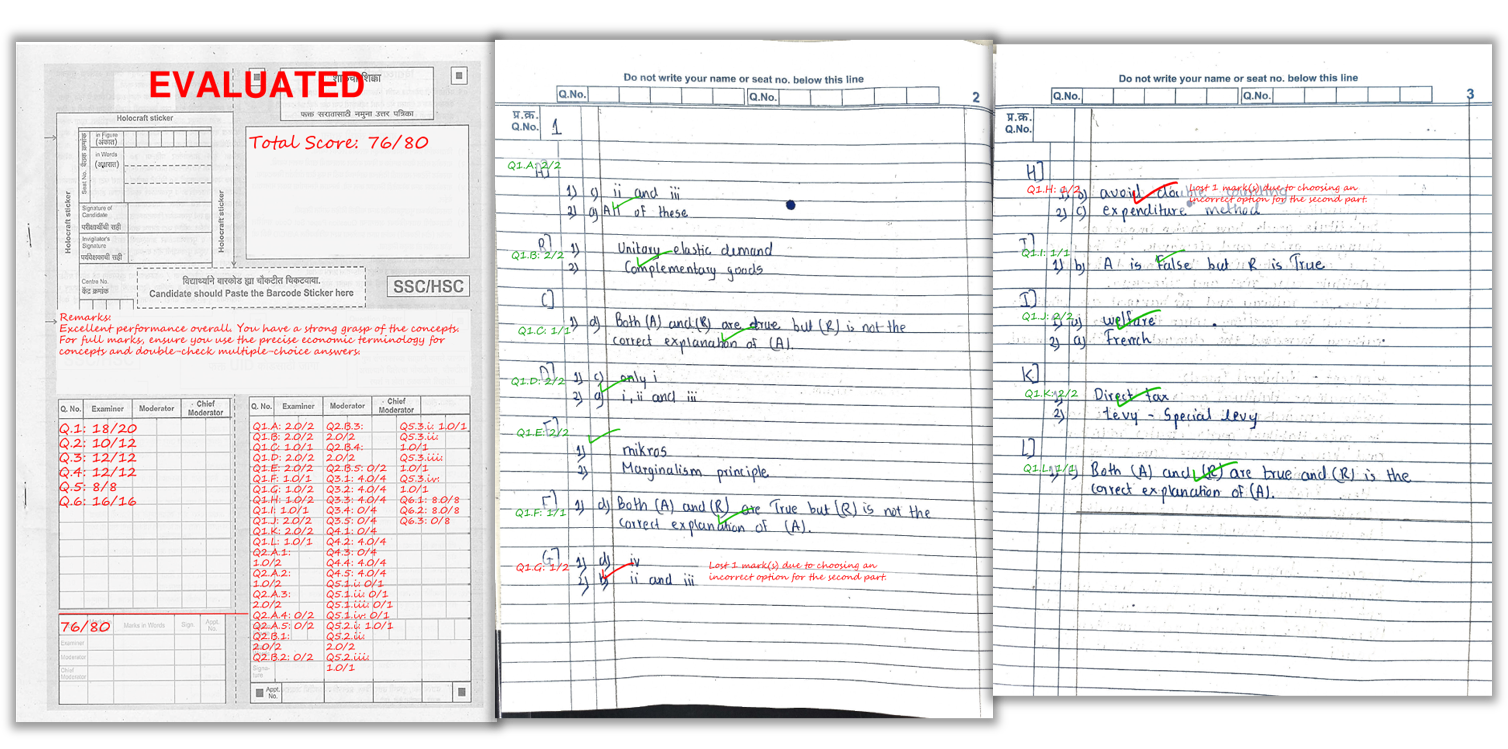
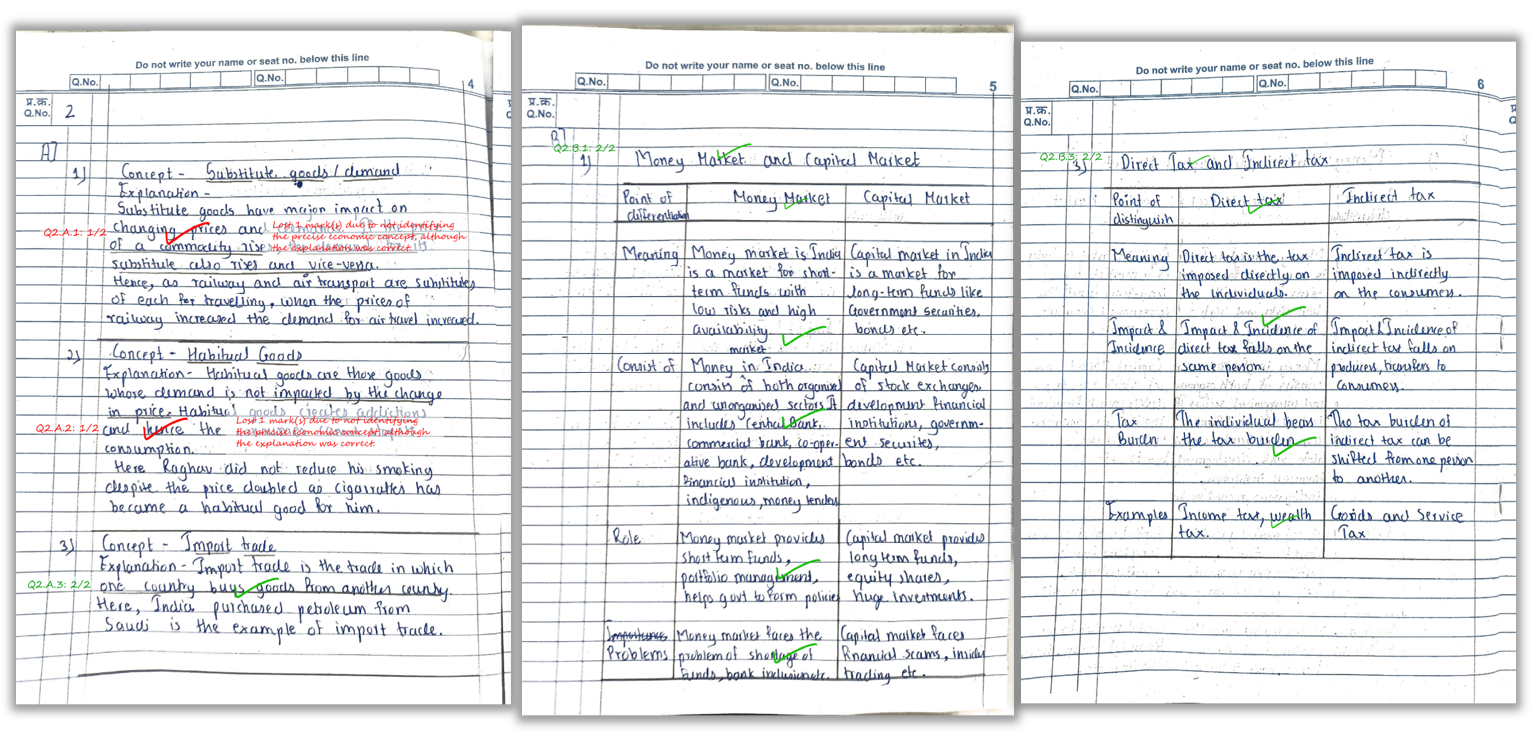
- Marked PDF with per-question scores and comments on the answer sheet
- Excel summary with total marks + overall feedback per student
- Question-wise insights (optional) like common mistakes and weak topics
Why Schools & Coaching Institutes are Switching to AI
The main reason is simple: it lets educators shift from repetitive work (checking) to high-value work (teaching, mentoring, improving answers). For coaching institutes, fast checking is also a business advantage—students want quick results and clear guidance.
What improves with AI grading
- Speed: faster result cycles, especially for high-volume batches
- Consistency: the same rubric is applied to everyone
- Quality of feedback: structured comments become possible at scale
- Analytics: find weak areas per question/topic across a batch
Scanning Tips Checklist (to get high accuracy)
Most “AI grading accuracy” issues come from scanning errors. Use this checklist:
- Lighting: bright, even light; avoid shadows on the page
- Flat pages: keep pages flat—don’t curve near the binding
- Full page in frame: borders visible, no cut corners
- High resolution: avoid overly compressed images
- Correct order: scan pages sequentially
- One answer per page rule (optional): helps question mapping
- Clear handwriting: encourage spacing and legibility
How E-Valuate AI Fits This Workflow
E-Valuate AI is built to make rubric-based evaluation practical for teachers and coaching institutes. You upload question paper and model answers, review/approve the rubric, collect student scans, and receive marked PDFs with consistent marking and summaries.
Here’s a real example of how marks and remarks appear on the student’s answer sheet.
Tip: For best accuracy, scan in good light, keep the page flat, and ensure the full page is visible.
FAQ
1) Can AI give partial marks for subjective answers?
Yes—when the rubric defines key points and scoring rules. AI can award partial credit if some concepts are correct and others are missing.
2) Will AI work for messy handwriting?
It works best with legible handwriting and clean scans. Very unclear writing may reduce recognition quality, just like human checking.
3) Is AI grading consistent across all students?
That’s one of the biggest benefits: the same rubric and strictness is applied across the entire batch, reducing evaluator-to-evaluator variance.
4) What do teachers receive after evaluation?
Typically: marked PDFs (with scores and comments on the answer sheet) and an Excel summary (totals + feedback). Some workflows also include analytics.
5) How do we ensure data privacy?
Use a platform with secure storage, access control, and clear deletion rules. For E-Valuate AI policies, refer to the legal links on the homepage.
6) How long does evaluation take?
Depends on batch size and pages. Smaller batches can be fast; larger batches can take longer. Queue and OCR complexity also matter.
Related Reading
Ready to automate your marking?
Explore Key Features, see Pricing, or Sign Up and start with free credits.