
Why Handwriting Is Harder Than Printed Text
Traditional OCR was built for printed text. Handwriting introduces enormous variation: shape, spacing, slant, ink pressure, page curvature, scanning shadows, and the natural inconsistency of writing quickly under exam conditions. Basic OCR breaks on cursive writing or fast-written answers.
A modern AI checking system must do more than convert images to letters. It must interpret where an answer starts and ends, which question it belongs to, and whether the meaning is correct — even when the writing is messy or the student has answered out of order.
The Three Technical Layers
Layer 1 — OCR and HTR (reading the handwriting)
Optical Character Recognition (OCR) handles clearly printed or typed characters. Handwritten Text Recognition (HTR) handles the variability of cursive and fast handwriting. Modern HTR models are trained on large datasets of diverse handwriting styles and use context to resolve ambiguous characters — similar to how a human reader guesses a messy word from the surrounding sentence.
The system also performs image pre-processing before recognition: deskewing tilted pages, adjusting contrast, and reducing noise from poor scanning conditions.
Layer 2 — Vision-Language Models (understanding layout)
Vision-language models (VLMs) go beyond reading characters. They understand the spatial structure of a page — identifying question number markers, underlined headings, answer regions, diagram areas, and the boundaries between one answer and the next. This is critical for question mapping: knowing that text on page 3 belongs to Question 5, not Question 4.
Layer 3 — NLP (evaluating meaning)
Once the handwritten text has been extracted and mapped to its question, NLP evaluates whether the answer's meaning matches what the rubric expects. For subjective answers, exact wording is not required. NLP checks semantic correctness — whether the student expressed the right concept, included the required key points, and avoided factually incorrect claims.
How the Full Pipeline Works
Step 1 — Scan and image normalisation
The system receives a scanned PDF. It normalises the image — deskewing, contrast adjustment, noise reduction — before passing it to the recognition layers. Good scanning reduces this correction workload and improves final accuracy.
Step 2 — OCR/HTR extracts text
Handwriting is converted to machine-readable text. The VLM layer simultaneously analyses the page layout, identifying where each answer lives on the page and how it is structured.
Step 3 — Question mapping
This is the step most AI tools get wrong. The system must correctly match every text segment to the right question number — even when students answer out of order, continue answers across pages, or write in the margins. Mapping accuracy directly determines whether step-wise and partial marks are reliable.
Step 4 — Rubric alignment and partial marking
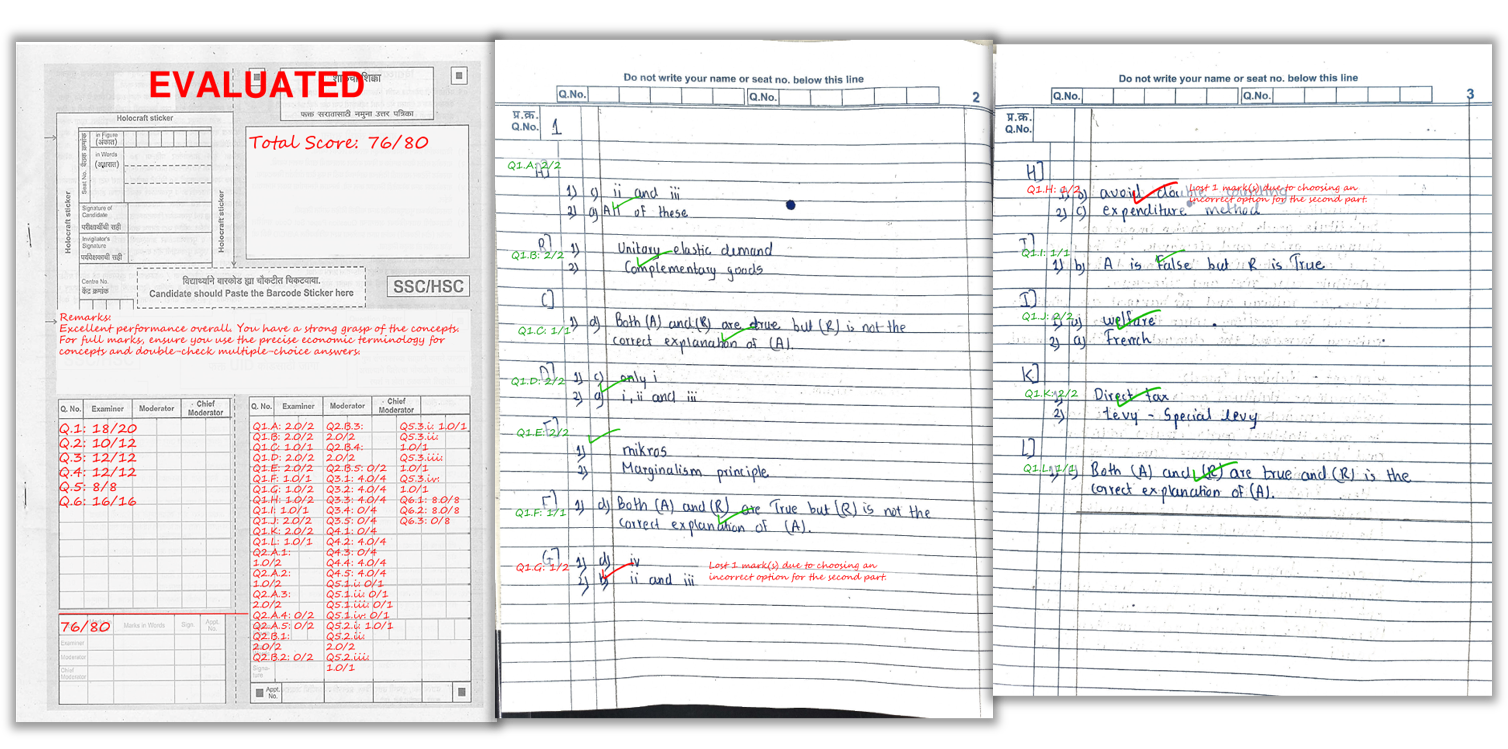
The teacher-approved rubric defines: marks per question, key concepts required, rules for partial credit, and strictness level. NLP compares the student's extracted answer to these criteria and awards marks accordingly. Where marks are deducted, the system generates a short, specific remark — "definition missing," "example not given," "incorrect formula in step 2."
Step 5 — Output generation
- Marked PDF with per-question scores and remarks on the student's actual answer sheet
- Excel summary with total marks and overall feedback per student
- Optional batch analytics showing class-wide performance on each question
A real example of how marks and remarks appear on a student’s answer sheet after AI checking.
What Affects AI Accuracy Most
| Factor | Impact on Accuracy | What to Do |
|---|---|---|
| Scan quality (lighting, flat pages) | High impact if poor | Follow scanning checklist strictly |
| Handwriting legibility | High impact if very unclear | Encourage spacing and clear headings |
| Rubric quality | High impact if vague | Define clear key points and partial mark rules |
| Page order | Medium impact if shuffled | Scan sequentially, confirm upload order |
| AI model quality | Handled by the platform | No action needed |
Scanning Tips to Maximise OCR/HTR Accuracy
- Bright, even lighting: avoid shadows across the writing
- Flat pages: reduce curvature near the binding
- Full page in frame: all corners visible, no cropped margins
- Scan sequentially: page order helps question mapping
- Dark ink: faint pencil reduces OCR quality significantly
Frequently Asked Questions
Is handwriting OCR accurate enough for school and coaching institute exams?
For clear handwriting and clean scans, yes. Accuracy drops when scans are dark, cropped, skewed, or handwriting is very unclear. Most accuracy problems trace back to scan quality, not the AI model itself.
Does AI require students to use exact wording to earn marks?
No. NLP evaluation focuses on meaning and the key concepts defined in the rubric. A student who explains the correct concept in their own words can still earn full marks.
Can AI detect diagram mentions and step-based answers?
Vision-language models recognise structural elements like question numbers, headings, and layout. For step-based answers, the rubric defines what must be present at each step, and the AI marks accordingly.
How does AI handle answers written out of order?
Question mapping identifies which text corresponds to each question number, even when students answer in a different sequence. The system matches text to questions based on markers and layout context.
What outputs do teachers receive?
Marked PDFs with per-question scores and remarks on the answer sheet, plus an Excel summary with total marks and feedback for the entire batch.
Is the teacher's rubric used by the AI or does the AI decide its own marks?
The teacher's rubric is the only marking logic the AI uses. The AI does not invent criteria or modify the marking scheme. It reads the answer, compares it to the approved rubric, and awards marks based on those rules.
Ready to automate your answer sheet checking?
E-Valuate AI processes handwritten papers for schools and coaching institutes across India. Sign up free and get 3,000 credits (worth ₹3,000) included.
Start Free — Get 3,000 Credits