
What You Need Before You Start
You do not need expensive hardware or IT infrastructure. Most schools and coaching institutes can start with existing smartphones and one person managing the upload process. The key requirements are:
- Scanning method: E-Valuate mobile app (students scan themselves) or a document scanner for staff-managed scanning
- Question paper and model answers: the rubric is generated from these — the better the model answer, the better the rubric
- One coordinator: a teacher or admin who sets up exams, uploads papers, and distributes results
- Internet connection: standard broadband or 4G is sufficient
The Rollout Workflow — Step by Step
Step 1 — Standardise the Scanning Process
Scanning quality is the single biggest variable in AI checking accuracy. Before your first exam, establish a scanning routine that every student or staff member follows consistently.
- Good lighting: bright, even light — no shadows across the writing
- Flat pages: keep pages completely flat; pages that curve near the binding produce distorted edges
- Full page in frame: all four corners visible in every scan
- Correct page order: scan sequentially — Q1, Q2, Q3 in order
- File naming convention: Class_ExamName_StudentName helps operational management
- Confirm upload: students or staff should wait for the upload success confirmation before closing the app
Step 2 — Create the Exam in the Dashboard
The exam coordinator uploads the question paper PDF and model answers PDF. The AI generates a draft rubric with per-question marks, expected key points, and suggested partial marking rules. The teacher reviews the rubric — adjusting any marks, adding key concepts, or setting strictness levels — and approves it before evaluation begins.
This approval step is non-negotiable. No paper is evaluated on a rubric the teacher has not signed off.
Step 3 — Collect Student Submissions
Students scan and submit via the E-Valuate mobile app using the unique exam code. For very young students or situations where student-scanning is impractical, a staff member can scan and upload on behalf of the class. Both workflows are supported.
Step 4 — Review the Rubric Once More (Optional but Recommended)
After the first 5 to 10 papers are submitted, it is worth reviewing the rubric once more against real student answers to ensure the key points and marks are calibrated correctly. You can adjust the rubric before all papers are processed if needed.
Step 5 — Receive and Distribute Results
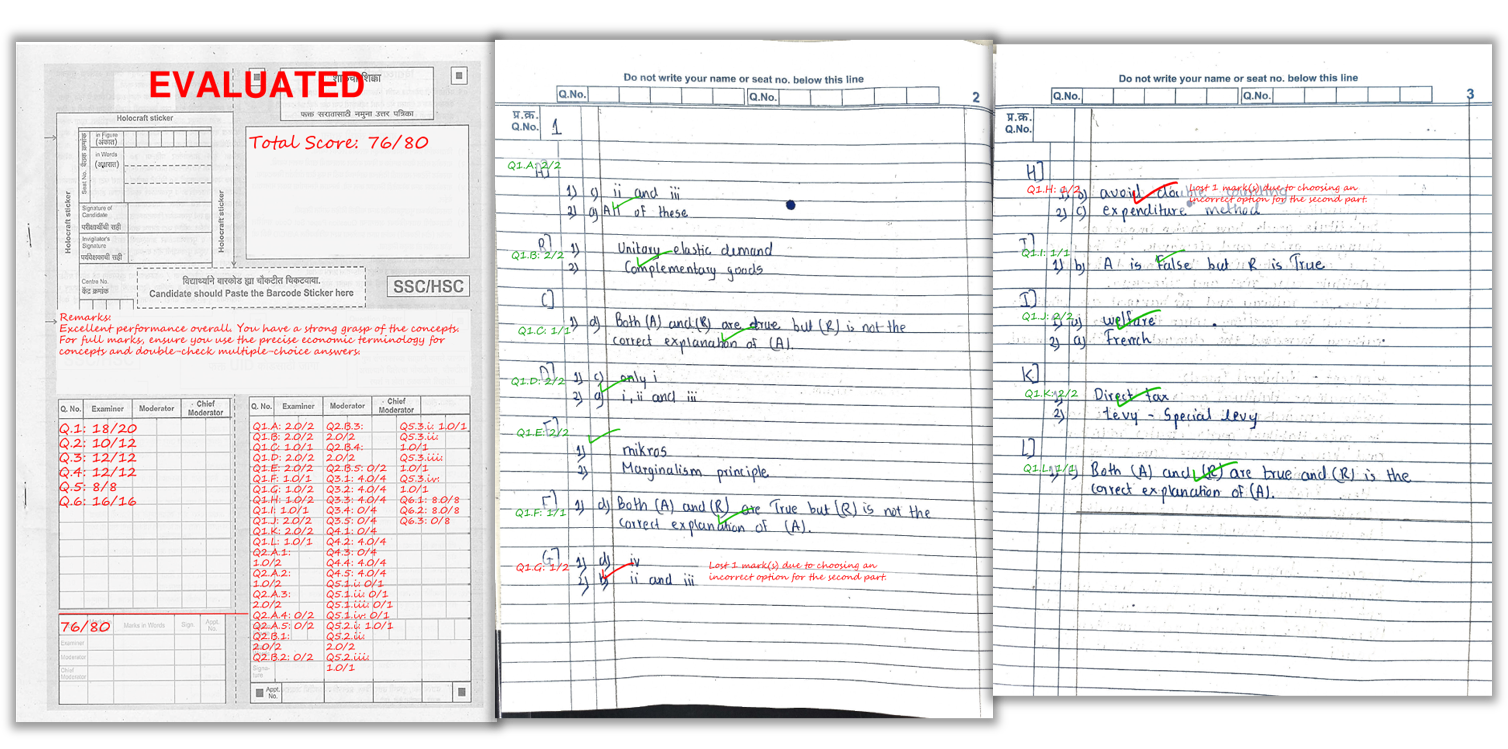
- Marked PDFs: one per student, with per-question scores and remarks written on the actual answer sheet
- Excel summary: total marks and overall feedback for the full batch — ready to share with students or parents
- Batch analytics (optional): question-wise performance showing which questions the batch found hardest — useful for planning revision sessions
A real example of how marks and remarks appear on a student’s answer sheet after AI checking.
Rollout Phases — Pilot to Scale
Phase 1 — Pilot (1 subject, 1 section, 1 test)
The fastest way to build confidence is to start small. Pick one teacher champion, one class, and one test with a clear marking scheme. Run AI checking in parallel with manual checking for 20 to 30 papers and compare results. This validates the scanning routine and rubric quality before any larger commitment.
- Use a subject with clearly defined answers (Science, Commerce, or History work well for pilots)
- Have the teacher who set the paper also approve the AI-generated rubric
- Compare 5 to 10 papers manually to build teacher confidence
Phase 2 — Expand (Multiple Sections, Same Paper)
- Standardise the rubric format across teachers for the same subject
- Train additional staff on the scanning and upload workflow
- Begin using batch analytics to identify weak topics for remediation
Phase 3 — Scale (School-Wide or Institute-Wide)
- Create reusable exam templates for repeat test formats
- Define a data storage and deletion policy for the institution
- Move to a bulk credits or institute plan once monthly volume is predictable
Common Mistakes to Avoid
- Rushing the rubric: a vague rubric produces inconsistent marks. Invest 10 minutes in rubric review before every exam.
- Poor scanning routine: more than half of all accuracy complaints trace back to dark, cropped, or skewed scans — not the AI.
- Skipping the pilot: running AI checking on 200 papers without a small pilot first removes the opportunity to catch rubric calibration issues early.
- Not sharing analytics: batch analytics are most valuable when teachers see them before the next topic begins — not after the exam cycle ends.
Frequently Asked Questions
Do we need a scanner to start AI paper checking?
No. Most schools start with phone scanning. A document scanner is helpful for very high volume but is not required. The E-Valuate app guides students through the scanning process.
How do we keep marks consistent across different teachers?
Use a standardised rubric format and ensure every teacher approves the rubric before evaluation begins. The same rubric applied to all papers produces consistent marks regardless of which teacher set it up.
Can AI award partial marks?
Yes. With a rubric that defines key points and partial marking rules, AI awards partial credit for partially correct answers. This is fully configurable per question during the rubric approval step.
What do teachers receive after evaluation?
Marked PDFs with per-question scores and remarks, plus an Excel summary with total marks and overall feedback per student.
How long does evaluation take for a full class batch?
Small batches of 20 to 30 students complete within an hour. Large batches of 100 to 200 students take 3 to 6 hours — compared to 2 to 5 days manually.
What is the best way to pilot AI checking before rolling it out school-wide?
Start with one teacher, one subject, and one test. Run AI and manual checking in parallel for 20 to 30 papers, compare results, and use that data to refine the scanning routine and rubric format before expanding.
Ready to automate your answer sheet checking?
E-Valuate AI processes handwritten papers for schools and coaching institutes across India. Sign up free and get 3,000 credits (worth ₹3,000) included.
Start Free — Get 3,000 Credits