
The Problem the App Solves
In most Indian schools and coaching institutes, running a practice test creates an immediate problem: someone has to check all those papers. For a teacher handling three sections of 40 students each, a single unit test generates 120 answer booklets. At 8 to 12 pages per student, that is 960 to 1,440 pages to check — on top of teaching, preparation, and administrative work.
The result is predictable. Either the checking gets compressed into late evenings, reducing quality and feedback detail. Or results take a week, by which point the teaching has moved on and the feedback arrives too late to be useful.
An AI exam checking app removes the bottleneck without removing teacher control. The exam format stays the same — students still write on paper — but the checking process is automated.
How the App Works
Step 1 — Teacher sets up the exam
The teacher uploads the question paper and model answers. The AI generates a marking rubric — with per-question marks, expected key points, and partial credit rules — and the teacher reviews and approves it. The exam is then assigned a unique code.
Step 2 — Students scan and submit
Students open the E-Valuate app, enter the exam code, and scan their answer sheets page by page. The app guides them through the process. No printer, no scanner, no physical submission required. Students get a confirmation when their submission is received.
Step 3 — AI checks the papers
OCR/HTR reads each student's handwriting. The system maps each answer to its correct question and evaluates it against the rubric — awarding marks, applying partial credit rules, and generating short remarks where marks are deducted.
Step 4 — Teacher receives results
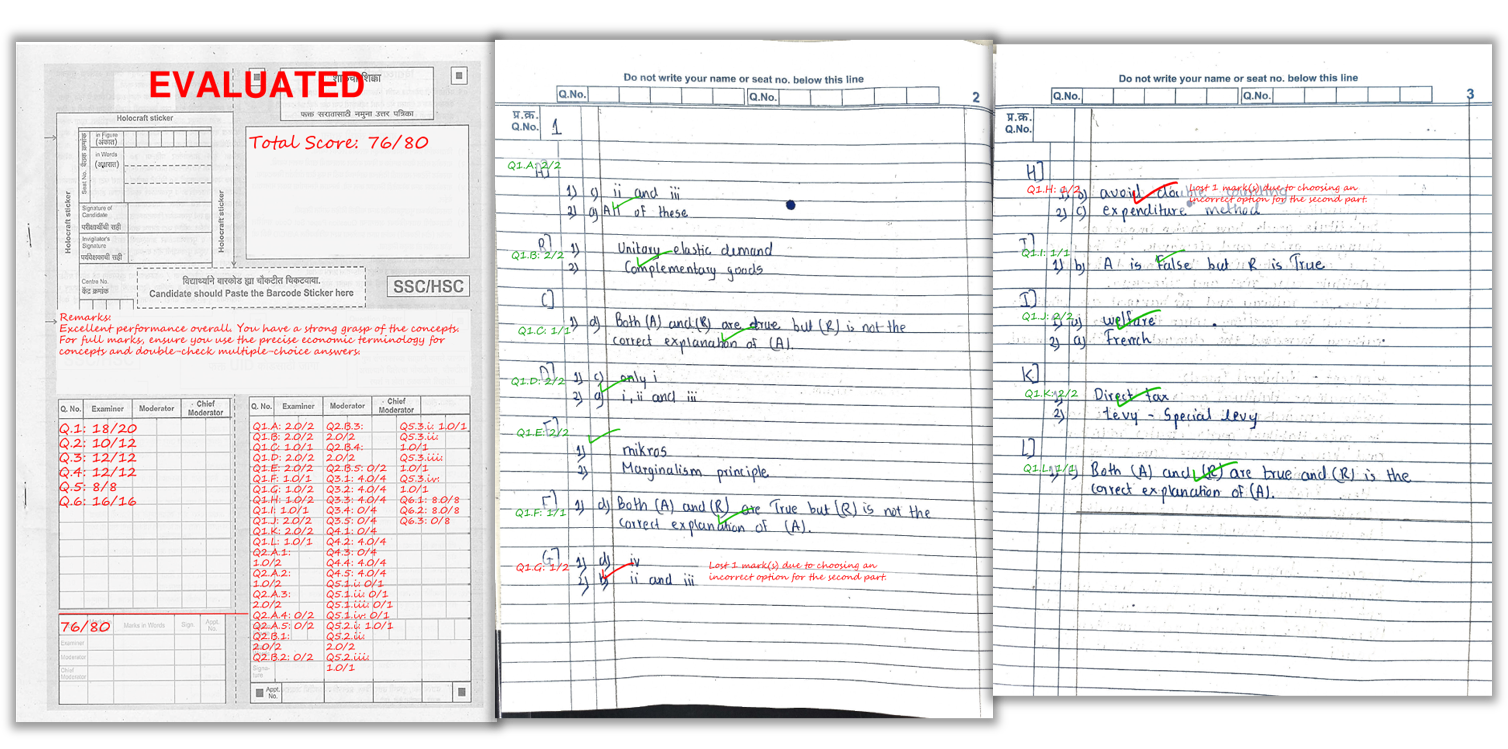
- Marked PDFs: one per student, with per-question scores and remarks on the actual answer sheet
- Excel summary: total marks and overall feedback for the full batch
- Optional analytics: question-wise performance across the batch showing which questions students found hardest
A real example of how marks and remarks appear on a student’s answer sheet after AI checking.
Who the App Is Built For
| User Type | Primary Benefit |
|---|---|
| Class teachers (schools) | Run more unit tests without increasing checking workload |
| Coaching institute teachers | Fast results for weekly mock tests — feedback before the next test |
| Exam coordinators | Consistent marking across all batches and teachers |
| College faculty | Internal assessment checking at scale without hiring additional examiners |
Scanning Tips for the Best Results
- Bright, even lighting: avoid shadows across the writing
- Full page in frame: all four corners visible
- Flat pages: reduce curvature near the binding
- Correct page order: scan pages sequentially
- Dark ink: faint pencil or light ink reduces OCR accuracy
- Wait for confirmation: students should not close the app until the upload success message appears
Frequently Asked Questions
Can the app evaluate both subjective and objective answers?
Yes. Rubric-based evaluation handles subjective descriptive answers. Objective questions can also be scored as right or wrong when the expected answer is clearly defined. Most schools use the app primarily for subjective and semi-descriptive papers.
Do teachers lose control when AI grades papers?
No. Teachers approve the rubric before any paper is evaluated. The AI applies the teacher's marking logic consistently. Teachers can review individual results and request re-evaluation if needed.
What files do teachers receive after evaluation?
A marked PDF for each student — with per-question scores and remarks on the answer sheet — and an Excel summary file with total marks and overall feedback for the entire batch.
Is phone scanning enough to use the app?
Yes. Students use the E-Valuate mobile app to scan and submit their own answer sheets. The app guides them through the scanning process to ensure good page quality. No dedicated scanner is needed.
Can coaching institutes use this app for frequent mock tests?
Yes. Mock tests are one of the best use cases. The fast turnaround — results within hours — means students can review mistakes while the content is still fresh, improving learning outcomes and test scores.
Is there a minimum order or subscription required?
No. E-Valuate uses credit-based pricing at ₹2 per page. Credits never expire. There is no minimum commitment, subscription, or monthly fee.
Ready to automate your answer sheet checking?
E-Valuate AI processes handwritten papers for schools and coaching institutes across India. Sign up free and get 3,000 credits (worth ₹3,000) included.
Start Free — Get 3,000 Credits