
Why Manual Checking at This Scale Breaks Down
For most teachers and coaching institutes, 100 papers is not an unusual batch size. A single subject test across two sections, a weekly JEE or NEET mock test, a unit test at a mid-sized coaching institute — all generate around 100 answer booklets.
Manually, 100 papers at 8 pages each is 800 pages. At an optimistic 4 minutes per paper — which includes reading, cross-checking the rubric, writing remarks, and recording the score — that is 6 to 7 hours of focused checking work. In practice, with interruptions and fatigue, it stretches to 2 to 3 days spread across evenings.
By the time results come back, students have already moved on to the next topic. The feedback arrives too late to change anything.
The Complete Timeline — Exam to Results in 1 Hour
Here is exactly what happens in each phase, with realistic time estimates for a 100-student batch (8-page answer sheets).
-
1
Before the exam: Rubric prep (10 minutes)
Upload the question paper and model answer to the E-Valuate dashboard. The AI generates a draft rubric with per-question marks and key points. The teacher reviews and approves it — adjusting any marks, adding expected concepts, and setting partial marking rules. This takes 10 minutes when the model answer is ready. Do this the evening before or the morning of the exam — not after the exam ends.
-
2
During or immediately after the exam: Student scanning (15–25 minutes)
Students open the E-Valuate app, enter the exam code, and scan their answer sheets using their phone cameras. With 100 students scanning simultaneously — each student spending 3 to 5 minutes on 8 pages — the entire batch uploads in 15 to 25 minutes. This is the biggest time variable. A well-briefed class with a scanning routine finishes at the lower end; a first-time batch takes closer to 25 minutes.
-
3
AI processing: 45–75 minutes
Once papers are uploaded, AI processing begins automatically. The system reads each paper via OCR/HTR, maps answers to questions, evaluates against the approved rubric, awards marks and partial credit, and generates remarks. For 100 papers at 8 pages each (800 pages total), processing typically completes in 45 to 75 minutes. The teacher does not need to do anything during this time.
-
4
Results ready: Download and distribute
When processing completes, the dashboard shows: a marked PDF for each student, and one Excel summary for the full batch. Both can be downloaded individually or as a bulk ZIP. The Excel file is ready to share with students, parents, or administration immediately.
What Actually Controls the Speed
Three variables determine whether you hit the 1-hour target or run closer to 90 minutes:
1 — Rubric readiness
If the rubric is prepared before the exam, the teacher approves it in 10 minutes and processing starts the moment the first paper uploads. If the teacher is creating the model answer from scratch after the exam, add 20 to 30 minutes. Prepare the rubric before the exam. This is the single most impactful habit to build.
2 — Scanning discipline
Scanning is the bottleneck, not AI processing. The difference between 15 minutes and 40 minutes of scanning time for 100 students comes down to three things: whether students have been briefed on the scanning routine before the exam, whether they use the correct app, and whether the exam room has adequate lighting.
3 — Scan quality
Poor scans (dark, cropped, skewed) do not slow down AI processing — but they do reduce OCR accuracy, which can affect marks. A paper that cannot be reliably read may require a re-scan. Each re-scan is a 3 to 5 minute delay. Preventing bad scans is faster than fixing them.
The Scanning Briefing That Saves 20 Minutes
Before the exam — ideally in the class session immediately before — spend 5 minutes briefing students on scanning:
- Download the E-Valuate app before exam day (not during)
- Keep your phone charged — scanning drains battery
- Use bright, even lighting — no shadows across the writing
- Keep pages completely flat — do not bend or fold pages while scanning
- All four corners of the page must be visible in the frame
- Scan pages in order: Pg1, Pg2, Pg3 — do not skip
- Wait for the upload success confirmation before closing the app
- Enter the correct exam code — write it on the board before the exam starts
This briefing takes 5 minutes. It saves 20 minutes of scanning delays, re-scans, and late submissions that slow down the batch.
What the Teacher Receives at the End
Marked PDF — one per student
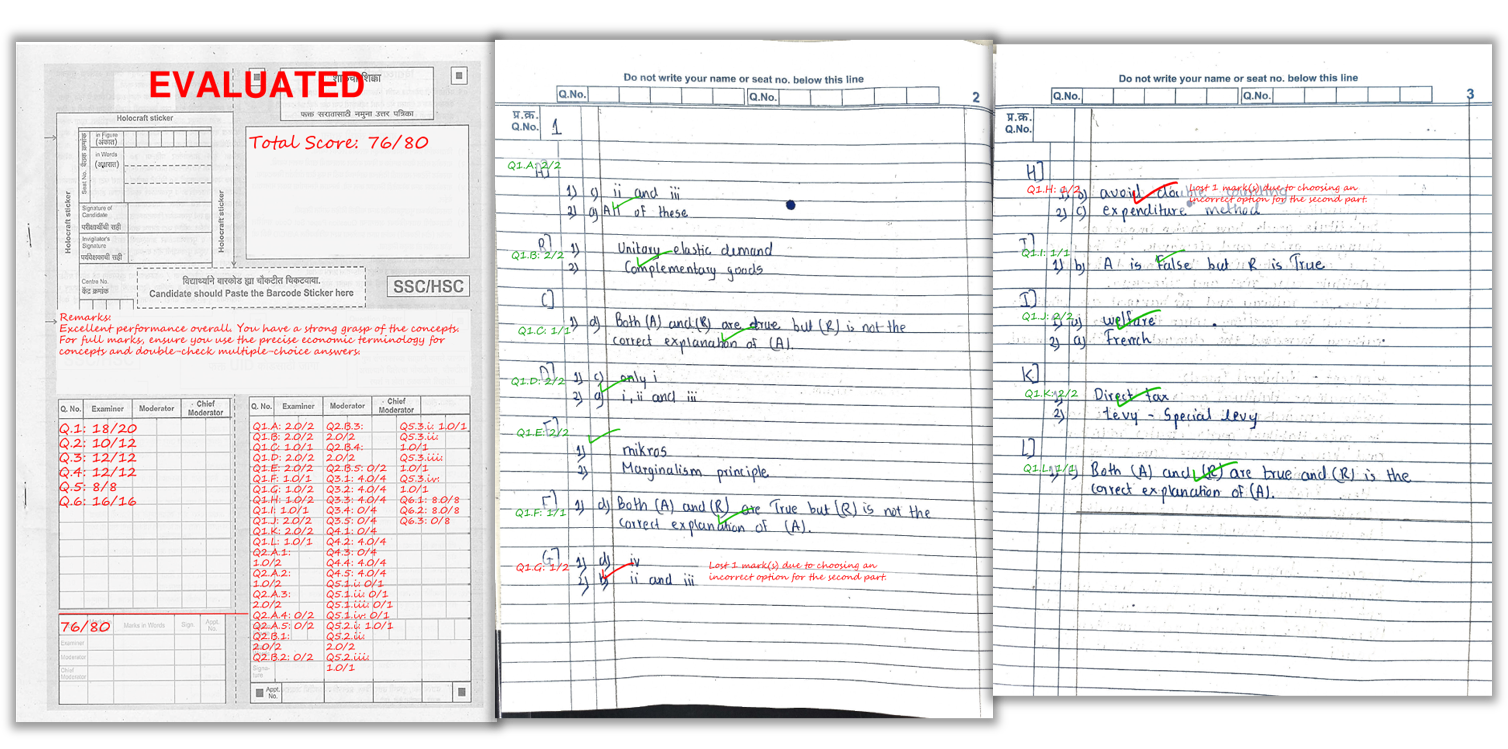
Each student's actual answer sheet comes back with per-question scores and short remarks written on the page — exactly as a human examiner would annotate it. Students can see exactly where marks were awarded and where they were not, and why.
Excel summary — one for the full batch
A single Excel file with every student's total marks, question-wise breakdown, and overall feedback. Ready to share with students, upload to your records system, or present in a parent-teacher meeting. No manual data entry required.
Batch analytics (optional)
A question-wise performance breakdown showing which questions had the lowest average score across the batch. This tells the teacher exactly which topics need a revision session — specific, actionable, and ready the same day as the exam.
A real example of how marks and remarks appear on a student’s answer sheet after AI checking.
Time Comparison: Manual vs AI Checking for 100 Papers
| Stage | Manual Checking | AI Checking (E-Valuate) |
|---|---|---|
| Rubric/scheme prep | 10–20 min (same) | 10 min (before exam) |
| Paper collection | 15–30 min (physical bundles) | 15–25 min (students scan via app) |
| Checking 100 × 8 pages | 6–10 hours spread over 2–3 days | 45–75 min (AI processing) |
| Results data entry | 30–60 min (Excel manually) | 0 min (Excel auto-generated) |
| Per-student remarks | Inconsistent; fewer as fatigue sets in | Consistent remarks on every paper |
| Total teacher time | 7–12 hours | ~25 min active (rest is AI) |
| Time to student feedback | 2–5 days after exam | Same day, often within 2 hours |
Works for These Exam Types
The 1-hour target is achievable for any exam format where answers can be evaluated against a defined rubric:
- Coaching institute mock tests: JEE, NEET, CA Foundation, CS, CMA — any test series with a model answer
- School unit tests and class tests: Class 8 to 12, all boards (CBSE, ICSE, SSC Maharashtra, all state boards)
- Prelim exams: same workflow as unit tests, slightly more pages per student
- College internal assessments: descriptive papers, short-answer tests, and theory examinations
- Competitive exam practice: any mock exam where the coaching institute has a marking scheme
Frequently Asked Questions
Is 1 hour realistic for 100 answer papers?
Yes, for papers of 6 to 8 pages each. AI processing for 100 papers (600 to 800 pages total) takes 45 to 75 minutes. Student scanning adds 15 to 25 minutes, giving a total of around 60 to 90 minutes from exam end to results in hand.
What is the actual bottleneck — scanning or AI processing?
Scanning is almost always the bottleneck, not AI processing. Once papers are uploaded, AI checking is fast. The variable that most affects total time is how smoothly scanning goes. Student-led scanning via the mobile app distributes the work and is usually faster than staff-managed scanning for batches larger than 40.
Does AI checking accuracy suffer when processing 100 papers at once?
No. The AI applies the same rubric to every paper regardless of batch size. There is no fatigue or consistency drop at paper 90 — which is the opposite of what happens in manual checking. Accuracy depends on scan quality and rubric quality, not batch size.
What do we need to prepare before the exam to hit the 1-hour target?
Three things: the question paper, the model answer to generate the rubric, and a scanning routine briefed to students before exam day. If these are ready before the exam starts, the 1-hour target is achievable on the first attempt.
Can we check papers from multiple sections at the same time?
Yes. Multiple batches can be uploaded under the same exam or as separate exams. AI processing runs in parallel, so adding more papers from different sections does not proportionally extend the processing time.
What outputs are ready after the 1-hour process?
A marked PDF for each student with per-question scores and remarks on the answer sheet, and an Excel summary with total marks and overall feedback for the full batch. Both are available for download as soon as processing completes.
Ready to check your next 100 papers in 1 hour?
E-Valuate AI processes handwritten answer sheets for schools and coaching institutes across India. Sign up free and get 3,000 credits (worth ₹3,000) included.
Start Free — Get 3,000 Credits